Tailor the resume.
Keep the record true.

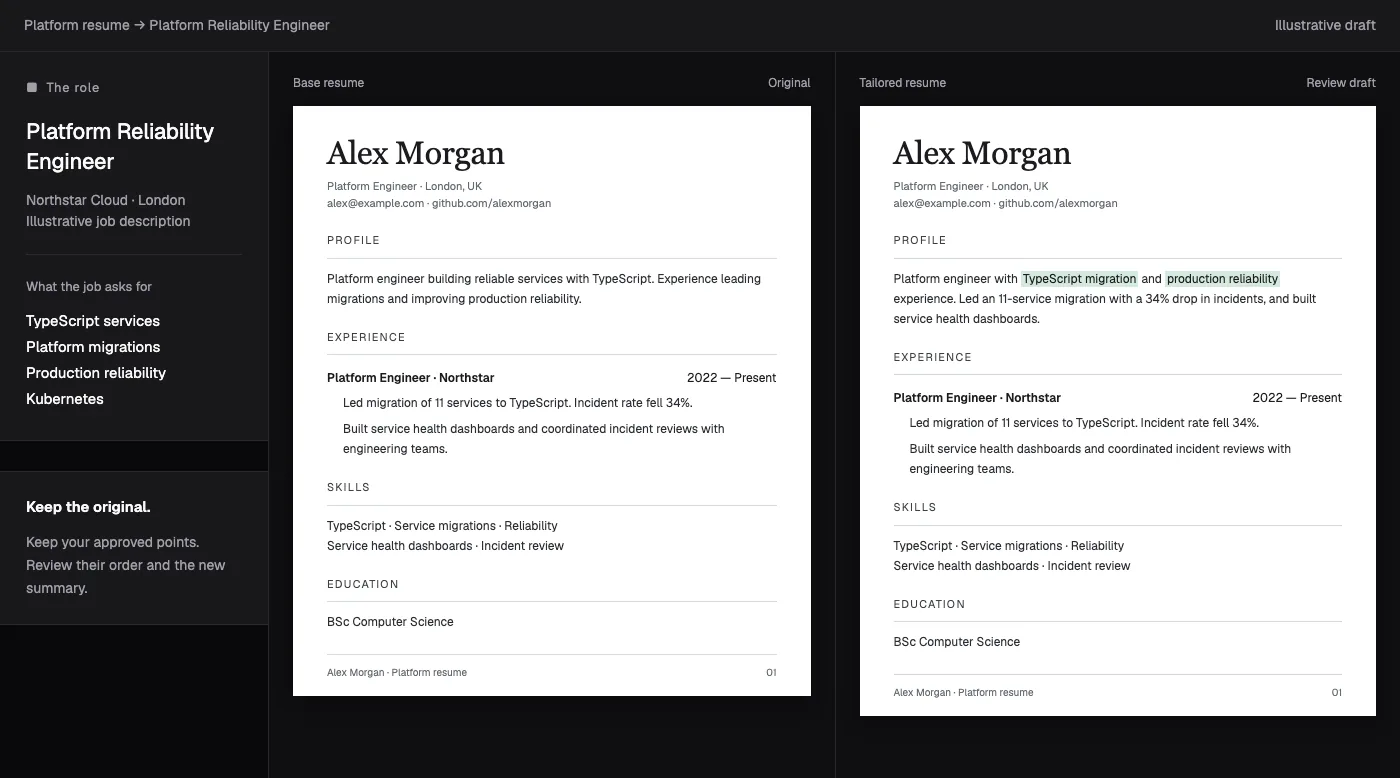
RolePatch reads the job description, matches it against evidence already in your resume, and proposes a reviewable patch. It can reframe proof. It cannot invent it.

Guest
Browser-local workspace
Account
Optional Google sync
Control
Review every patch
Illustrative patch 07Evidence checked

Job requirement

Own a TypeScript platform migration and show measurable reliability impact.

Existing resume evidence

Led migration of 11 services to TypeScript. Incident rate fell 34%.

Supplied by candidate

Proposed wording

Led a TypeScript migration across 11 services, reducing incidents 34%.

Every fact traced to source
Unsupported requirement: KubernetesLeave it out. Do not invent it.

A focused preparation desk for a job seeker who cares about this application.

A generic resume asks an employer to find the relevant evidence. RolePatch starts with the actual role, identifies what must be answered, and helps move supported proof into the foreground.

The result is not an automatic application factory. It is a traceable set of materials the candidate can inspect, correct, accept, and carry into a review-first application workflow.

Open the achievement evidence bank

Job description in.
Reviewable patch out.

The mechanism is intentionally simple enough to audit. Secondary features only matter after the candidate understands where each changed claim came from.

  1. 01

    Bring one specific job

    Paste the posting URL. RolePatch extracts the responsibilities, hard skills, language, and visible requirements that this application actually needs to answer.

  2. 02

    Match against existing proof

    Your base resume, project stash, and achievement evidence are the only claim sources. Relevant proof moves forward; unsupported requirements stay visible as gaps.

  3. 03

    Inspect the proposed patch

    The revised resume arrives with a word-level diff and a reason for each meaningful edit, tied back to the requirement or keyword that prompted it.

  4. 04

    Accept, edit, or leave it out

    You keep control of the final wording. The accepted resume can then anchor a cover letter, fit analysis, interview stories, and a reviewed application packet.

Better phrasing is allowed.
Better fiction is not.

RolePatch's tailoring instruction forbids adding a skill, metric, employer, tool, or accomplishment merely because the job description asks for it.

Base resume · supplied textRequirement: platform reliability

Led the migration of 11 services to TypeScript and reduced production incidents by 34%.

Proposed resume · review required0 unsupported facts

Led a TypeScript platform migration across 11 services, reducing production incidents 34%.

  • “Platform” mirrors the job's language and remains supported by the 11-service scope.
  • The service count and outcome are preserved exactly from supplied evidence.
  • Kubernetes is omitted because the source does not demonstrate it.

This example is illustrative. The source line already contains every employer-facing fact shown in the patch.

The resume is the start, not six disconnected AI outputs.

Once the resume patch is accepted, RolePatch can keep the role, evidence, materials, answers, and application history together. Each layer remains reviewable.

Build the role workspace
01

Tailored resume

One saved version per role, with the base resume preserved.

02

Fit analysis

Requirement coverage and visible gaps—not a universal hiring prediction.

03

Cover letter

Role- and company-specific material grounded in the same supplied proof.

04

STAR+R stories

Interview preparation mapped to the job and candidate evidence.

05

Evidence bank

Reusable achievements with situation, action, result, metric, scope, and source context.

06

Application packet

Resume, answers, proof, and receipt history collected for review.

The stops are part of the product.

Queueing, packet preparation, reviewed browser checks, Chrome-assisted fill, and guarded single-submit attempts can remove repetition. They do not remove the user.

APPLICATION RECEIPT · GREENHOUSE · REVIEW 03BLOCKED SAFELY

Prepared

12 fields9 answered · 2 skipped · 1 needs review

Files

0 uploadedUser selection still required

Submit

Not attemptedRequired answer missing
10:14:07

Work authorization answer not found in reviewed profile.

10:14:07

Submit guard engaged. No click sent to ATS.

10:14:08

Failed receipt saved with next action: answer and retry.

CAPTCHA or human verification

Stop. No bypass attempt.

Required answer is missing

Stop. Surface the exact answer gap.

A file still needs selection

Stop. The user chooses the file explicitly.

Submit state is ambiguous

Record a failed receipt for review.

Start in the browser.
Pay for signed-in AI work when needed.

RolePatch has a real mixed access model. Free browser tools, guest-local work, account persistence, and token-funded AI operations are different things.

01

Guest browser

Resumes, jobs, tailored drafts, evidence, and application metadata can stay in the current browser. The current guest tailoring path does not debit account tokens.

Clearing browser storage can remove guest data.

02

Google account

Sign-in adds user-scoped D1 persistence and starts a new account with three tokens. Signed-in AI tailoring, cover letters, fit scoring, interview prep, and outreach consume tokens.

The reviewed queue, packet, fill, and receipt workflow does not spend tokens.

03

Token packs

  • 10$5
  • 30$12
  • 100$30
No subscription. Purchase requires sign-in and working Dodo provider configuration; this audit did not complete a live transaction.

Free, local tools: ATS structure check · keyword overlap · bullet check · word count · resume diff · snippets

Use the free tools

Use RolePatch when the role matters enough to inspect the details.

A good fit

You have real experience to work with, a specific job description, and want the relevant proof stated clearly across the resume and supporting application.

Not a fit

You want invented qualifications, a universal hiring score, CAPTCHA solving, unattended file uploads, or bulk applications submitted without review.

What happens to the resume, the data, and the application?

Precise enough for a candidate to decide whether RolePatch belongs in a real job search.

Read every answer
What is RolePatch?

RolePatch is a web app for preparing a serious application to a specific job. It reads the job description, matches its requirements against your resume and saved evidence, proposes a tailored resume patch, and shows the changes for review. Cover letters, fit analysis, interview stories, and application packets stay tied to the same role.

Can RolePatch invent a stronger achievement for me?

No. The tailoring instruction explicitly forbids invented skills, tools, employers, scope, metrics, or accomplishments. RolePatch may reframe, reorder, and emphasize facts already present in the resume, project stash, or achievement evidence. If a job requirement is unsupported, the correct result is a visible gap—not a fabricated claim.

Can I use RolePatch without signing in?

Yes. Guest mode keeps resumes, jobs, tailored drafts, evidence, and application metadata in the current browser. The current guest tailoring path can call the configured AI route without debiting account tokens. Google sign-in adds D1-backed persistence and cross-device account use; clearing browser storage can remove guest data.

What is free, and what uses tokens?

The public ATS, keyword, bullet, diff, snippets, and word-count tools work without sign-up. Signed-in accounts start with three tokens. Tailoring, cover letters, fit scoring, interview prep, outreach drafts, and bulk fit scoring debit tokens; packs are implemented at 10 for $5, 30 for $12, and 100 for $30, with no subscription.

Does RolePatch automatically apply to jobs?

No. RolePatch is review-first by architecture. It can queue a job, prepare a packet, run reviewed browser checks, and fill supported ATS fields after a user action. CAPTCHA, missing required fields, outstanding file uploads, and ambiguous submit states stop the flow and create a blocked or failed receipt instead of an unattended submission.

What does the Chrome extension do?

On supported ATS pages, the extension can save a job, open its tailoring flow, retrieve a reviewed application packet, fill visible fields after a user click, and capture fill or submission receipts. A file is used only when the user explicitly selects it, and the extension does not bypass CAPTCHA.

Make the relevant truth easier to see.

Bring the job description and the resume you actually earned. RolePatch will help map one to the other—and show you the patch before you use it.

Open RolePatch